
Block the phishing pages your email filter misses.
Brand-new phishing gets past email filters because nobody has seen it yet. SafeToOpen checks the page as it loads and blocks it before a password is entered.
Built for the sectors where phishing hits hardest: Healthcare · Universities · Government · Construction · Manufacturing · Professional services · Law firms · Insurance · Banking
Monday, 9:12 am
Someone in sales opens a “shared document” email and lands on a sign-in page that looks exactly like Microsoft’s. The site is two hours old, so no filter has heard of it yet. SafeToOpen blocks it before a password goes in.
The incident is already waiting in your console, marked critical: who it was, which page, and which email it came from. One confirm, and the address is blocked on your network and on every laptop.
Eleven other people got the same email. None of them can open it now.
You found out from a calm alert, not a locked mailbox.
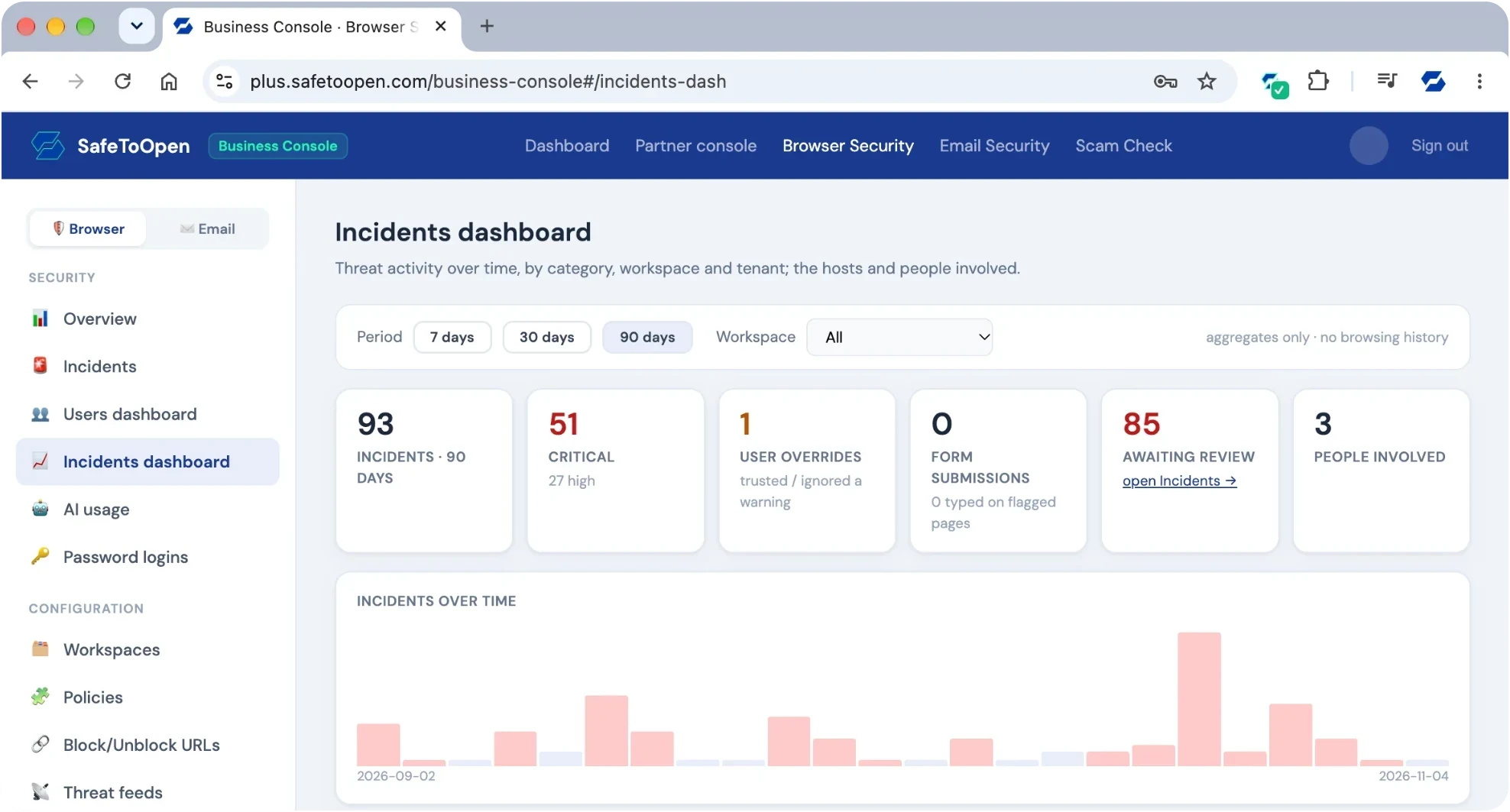
Your SafeToOpen: six products
Protect the inbox, the browser and your brand. Measure your people, and get more from your SIEM. Pick a product.
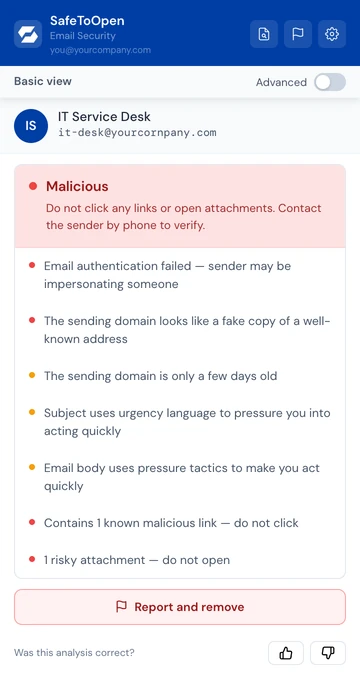
Email Security
Protects the inbox
- One click checks any email, in Outlook or Gmail
- Trust scores and up to 71 checks on the sender, links, QR codes and attachments
- Deeper Analysis for business email compromise and attacks on executives
Now on the Google Workspace Marketplace
The real add-in panel in Outlook.
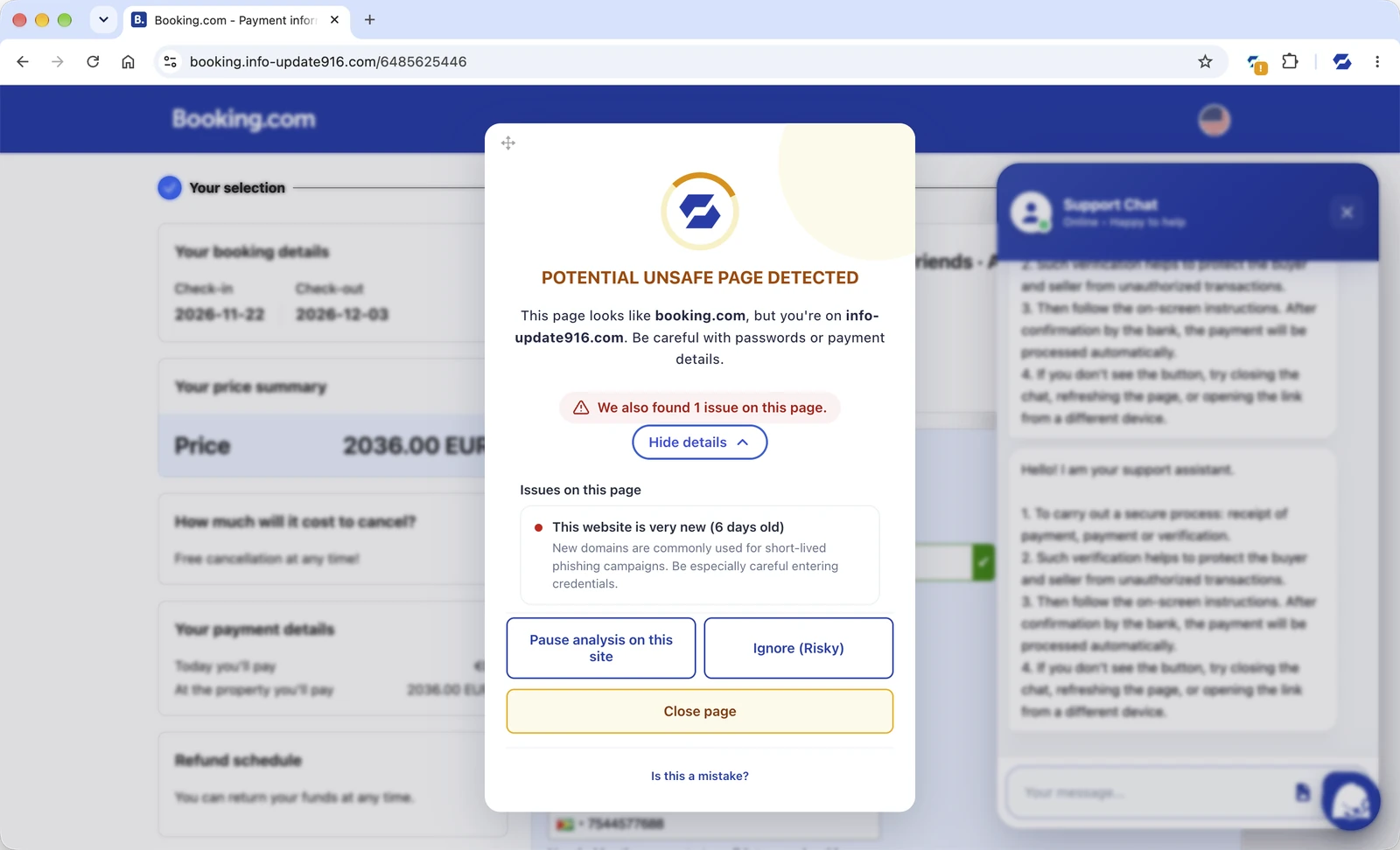
Browser Security
Protects the browser
- Catches never-before-seen phishing pages as they load
- Blocks malware and malicious sites, and stops sensitive data being pasted out
- Desktop and mobile, including Microsoft Edge on Android
The real extension on a fake payment page.
- From your logsYour public web server already records the referral URL of every visit to your sign-in pages.
- To usYour SIEM or log collector emails those URLs to us every few minutes.
- ScannedEach one is opened with the same engine as the browser extension.
- FlaggedYour security team gets the alert with the evidence, and partners such as VirusTotal flag the fake.
Brand & Customer Protection
Protects your customers
- Finds lookalike domains and fake sites built to impersonate you
- Scores each suspect and captures the evidence
- Often catches a fake while the kit is still being built
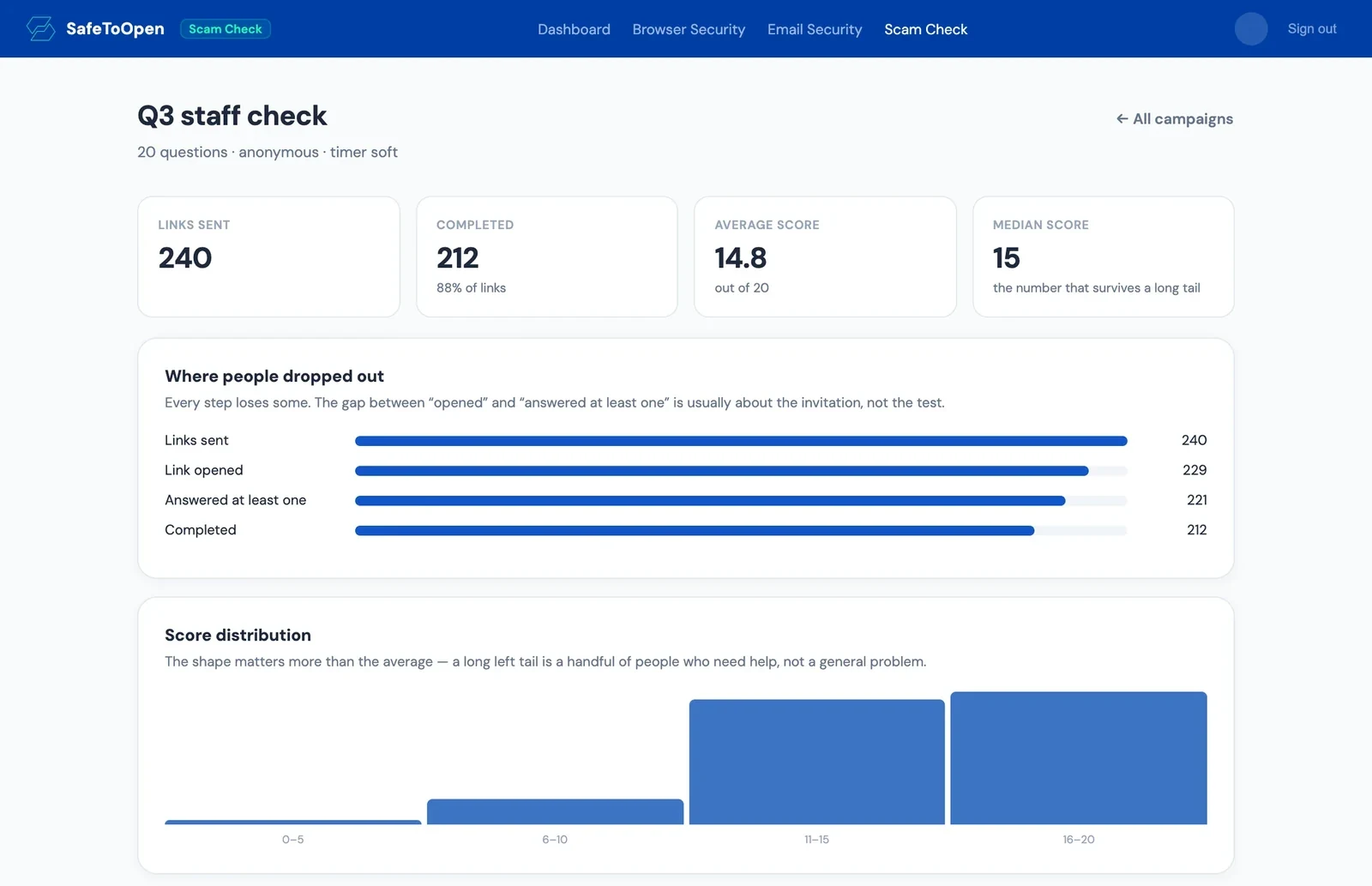
Scam Check
Measures your people
- A short, timed test built from real scam techniques
- Scored per person and per team, across email, text, phone and QR
- Anonymous mode, and a score export for your auditor, insurer or board
The real Scam Check results, with example data.
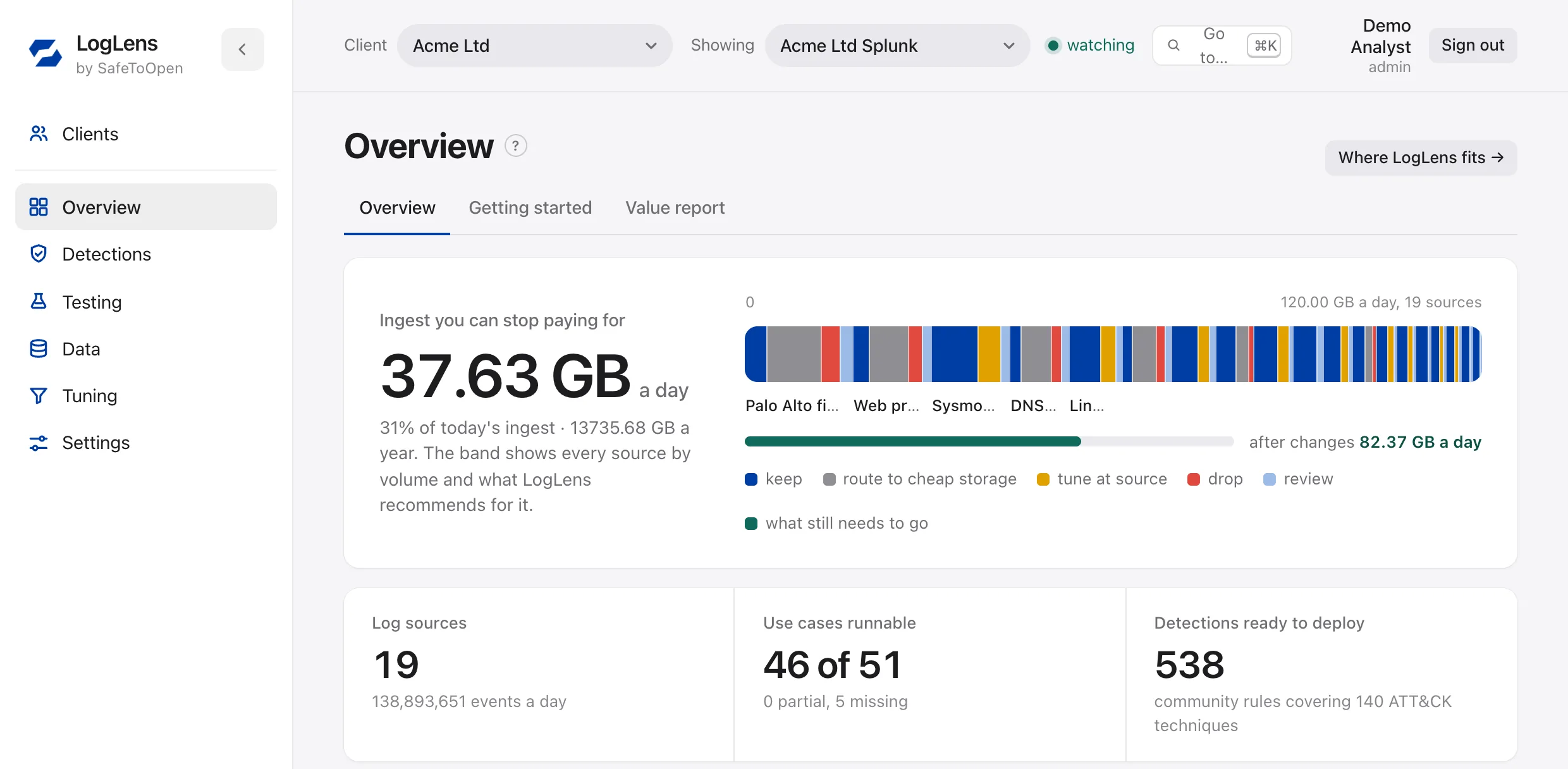
LogLens
Gets more from your SIEM
- Maps your logs to MITRE ATT&CK and shows what your SIEM can detect
- Finds the ingest no detection uses
- Deploys reviewed detections to your SIEM and playbooks to your SOAR, and Fire Drill proves they fire
The real LogLens overview, with sample data.
{
  "verdict": "malicious",
  "raw_result": "Phishing",
  "matched_profile": "microsoft.com",
  "confidence": 0.98,
  "final_url": "https://login-micros0ft.example/signin",
  "alerts": [{
    "level": "high",
    "text": "Mentions Microsoft, but isn't microsoft.com."
  }],
  "domain": { "age": { "age_days": 2 } },
  "elapsed_ms": 15840
}Developer API
Our verdicts in your tools
- Send a link, get back a verdict with the evidence: screenshot, redirect chain and the brand impersonated
- Every link opened live in an isolated browser, usually in 15 to 20 seconds
- For your SOAR playbooks, your own product or your customer portal
Email Security, Browser Security, Brand & Customer Protection and the API run on one real-time detection engine. Running a security team? Read the Browser Security capabilities & data-protection overview → · See plans →
Watch the protection work
SafeToOpen catches zero-day threats in the two places they reach your people. Pick one to see it.
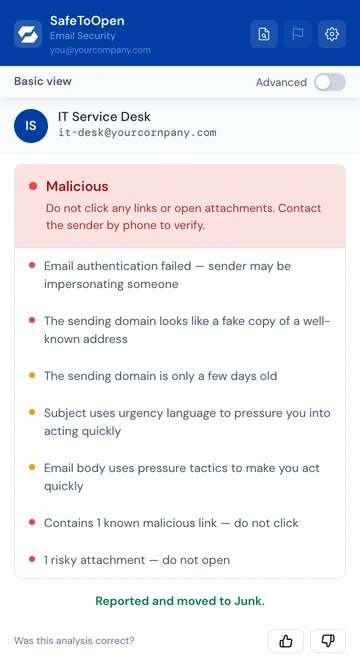
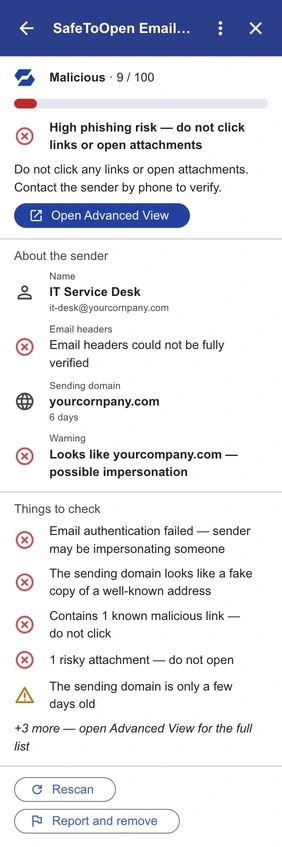
A fake IT password email from a look-alike of your company’s domain. Malicious, with the reasons, and one click to report and remove it.
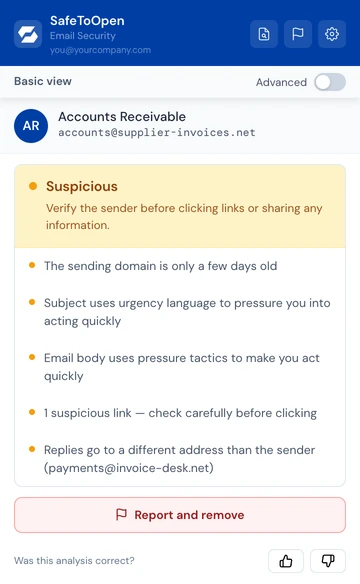
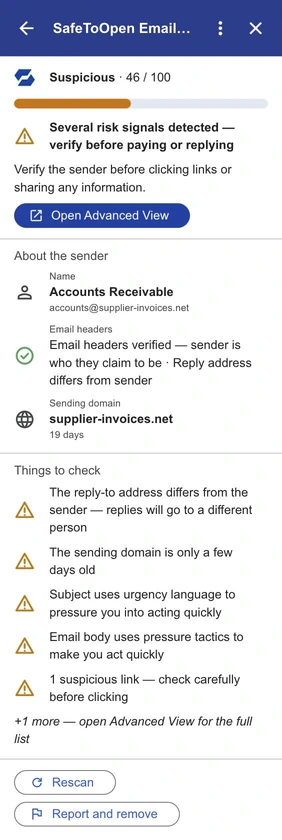
An overdue invoice with new bank details. It passes authentication, so SafeToOpen shows what doesn’t add up: replies go elsewhere and the domain is days old.
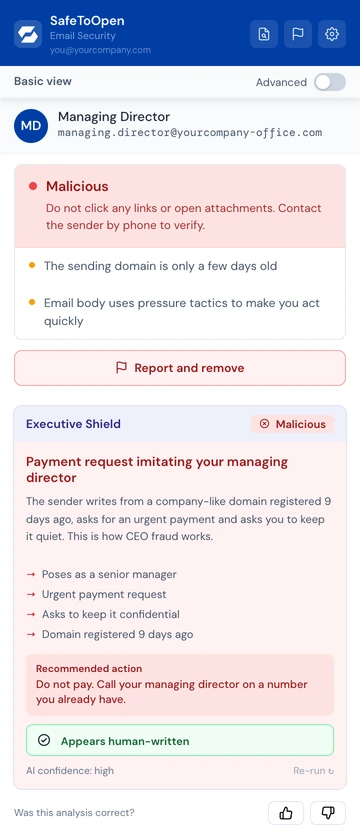
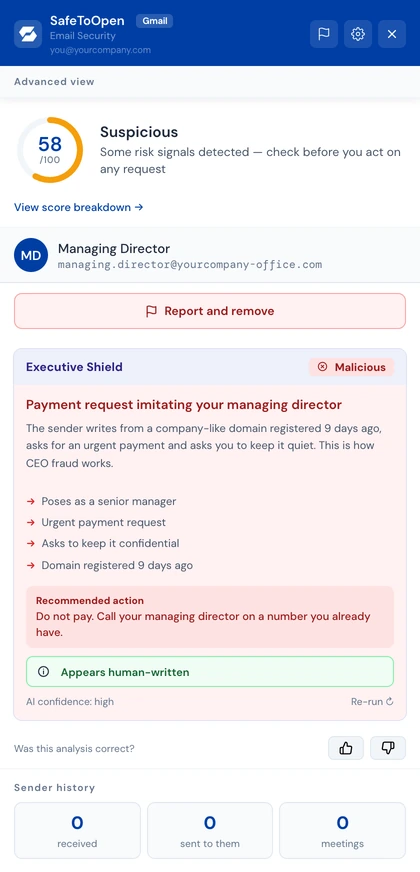
A payment request posing as your managing director: no link, no attachment. Deeper Analysis, on Executive seats, reads the request itself and calls it Malicious.
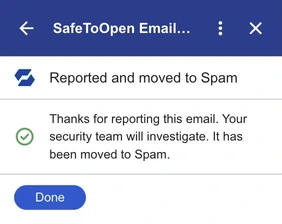
One click sends the email to your security team and takes it out of the inbox: to Junk in Outlook, to Spam in Gmail.
The real SafeToOpen panel in Outlook, shown with example emails.The real SafeToOpen add-on in Gmail (side panel and Advanced View), shown with example emails.
The threats your current tools miss
Gateways and filters wait for a threat to be known. SafeToOpen judges it the moment it appears, at the point of click.
SafeToOpen beside the tools you already run
Gateways, Defender and web filters judge by reputation. Here is what that leaves open.
| Capability | SafeToOpen | Email gateway (Proofpoint, Mimecast) · Defender · web filter |
|---|---|---|
| Catches zero-day phishing | ||
| Protects at the point of click, in-browser | ||
| Verifies email in Outlook & Gmail | Partial | |
| Deeper Analysis for BEC / executives | Partial | |
| No browsing data collected or sold | ||
| SIEM / SOAR integration | Varies | |
| Pushes a confirmed block into your DNS filter, EDR, firewall, mail gateway and IdP | Manual |
GuideWhy Microsoft Defender still needs browser-layer protection →
The layer your stack is missing
Beyond phishing: the attacks that pass MFA
The attacks that get past MFA are the ones the rest of your stack cannot see. Browser Security stops them in the browser. Pick one.
- The trick
A fake “I’m not a robot” check
- The moment
It asks you to paste a command into Run
- SafeToOpen
Swaps the command and sends your SOC the payload
- The trick
A genuine Microsoft or Google sign-in
- The moment
A rogue app asks for lasting mailbox access
- SafeToOpen
Warns or blocks, and records the app and its scopes
- The trick
A proxy kit mirrors your real login
- The moment
The work password goes into the wrong site
- SafeToOpen
Catches it before it is sent; nothing leaves the device
- The blind spot
Staff sign in to apps without SSO
- The risk
The work password is reused on them
- SafeToOpen
Lists every app, per person and workspace
From verdict to containment in seconds
SafeToOpen makes the call. The tools you already run act on it, on one confirm or by a rule you set.
Detect
Browser Security judges the page as it loads; Email Security checks the message in Outlook or Gmail.
0.3 s to verdictTriage
The incident arrives with the URL, the user, the sender and the evidence, in the console, Slack or Teams.
Pages the on-call if severity warrants itContain
One confirm from an analyst, or a rule above a severity you set, runs every action at once.
All actions in parallelClose the loop
A ticket in ServiceNow or Jira, the record in your SIEM, and who ran each action.
Reversible actions roll back in one click
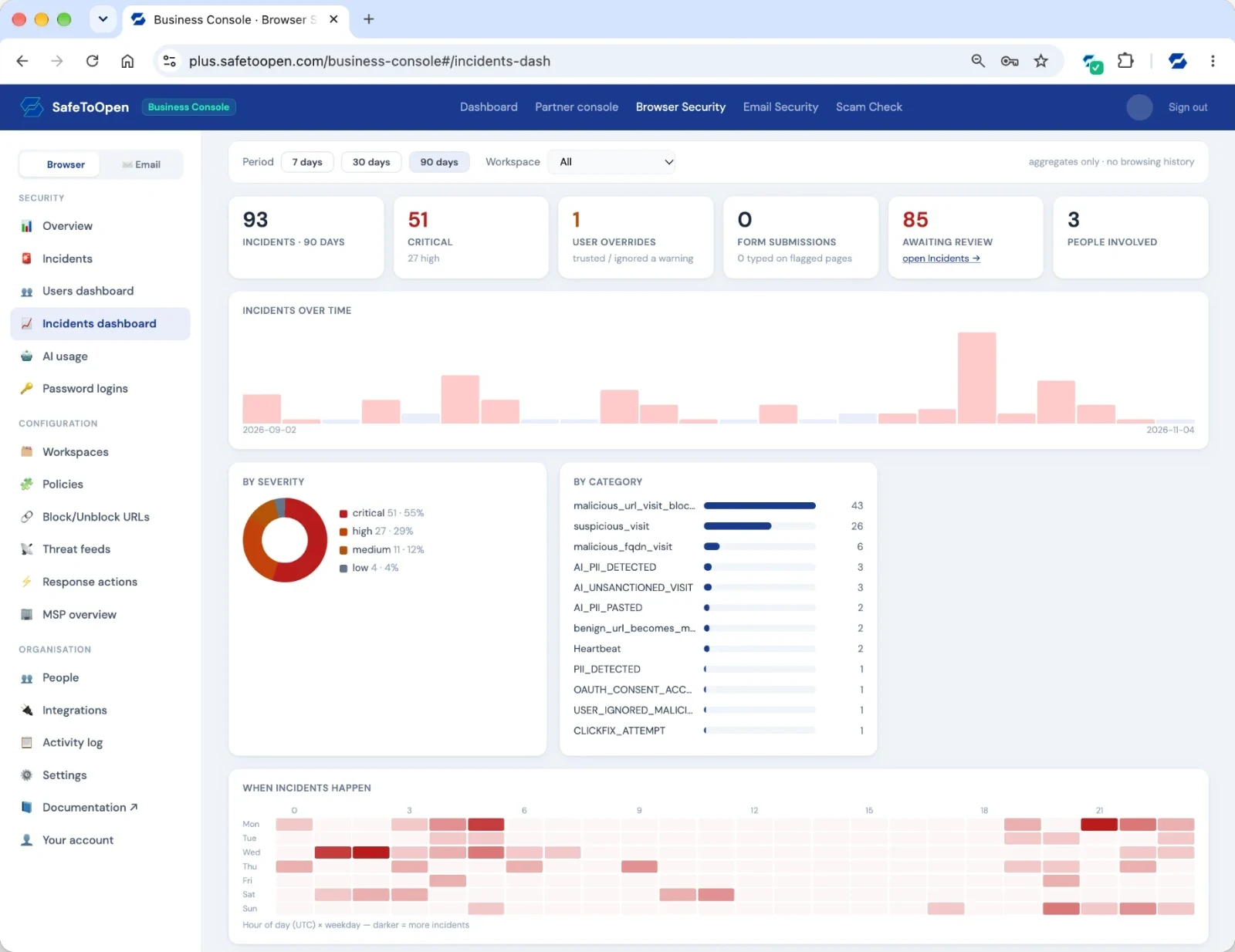
Blocks land in the tools you already run: Cisco Umbrella, Zscaler, Defender for Endpoint, CrowdStrike, Palo Alto, Microsoft 365, Entra ID, Okta, Slack, ServiceNow and more.
Shadow AI, governed in the browser
Your people already paste customer data into personal AI tools. Decide which tools are allowed, and show the board and the auditor who uses which.
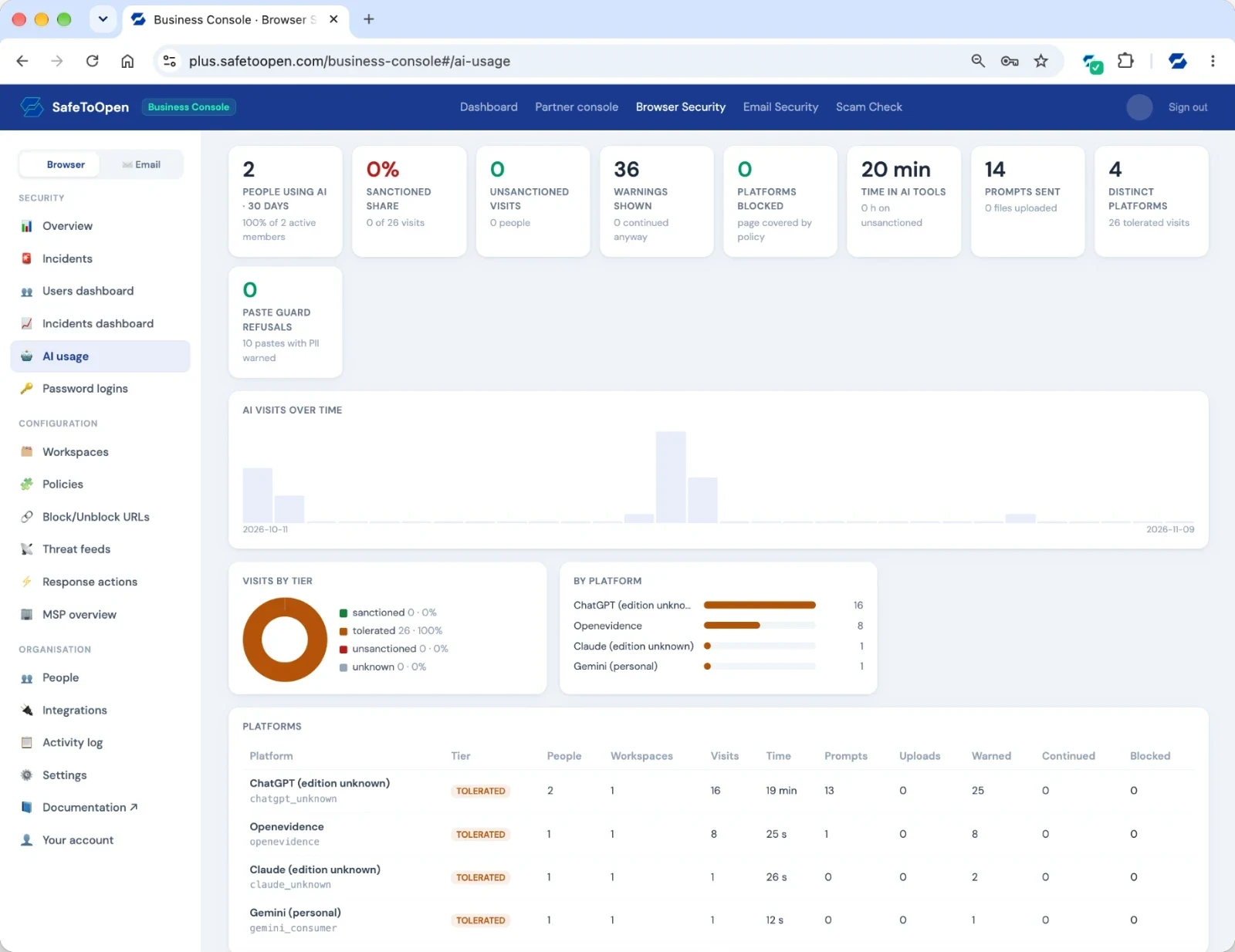
Set per workspace in Policies; not shown on this screen.
Every email threat, in one view
See incidents, the people being targeted and the senders behind them, across every mailbox.
Shown with test data.
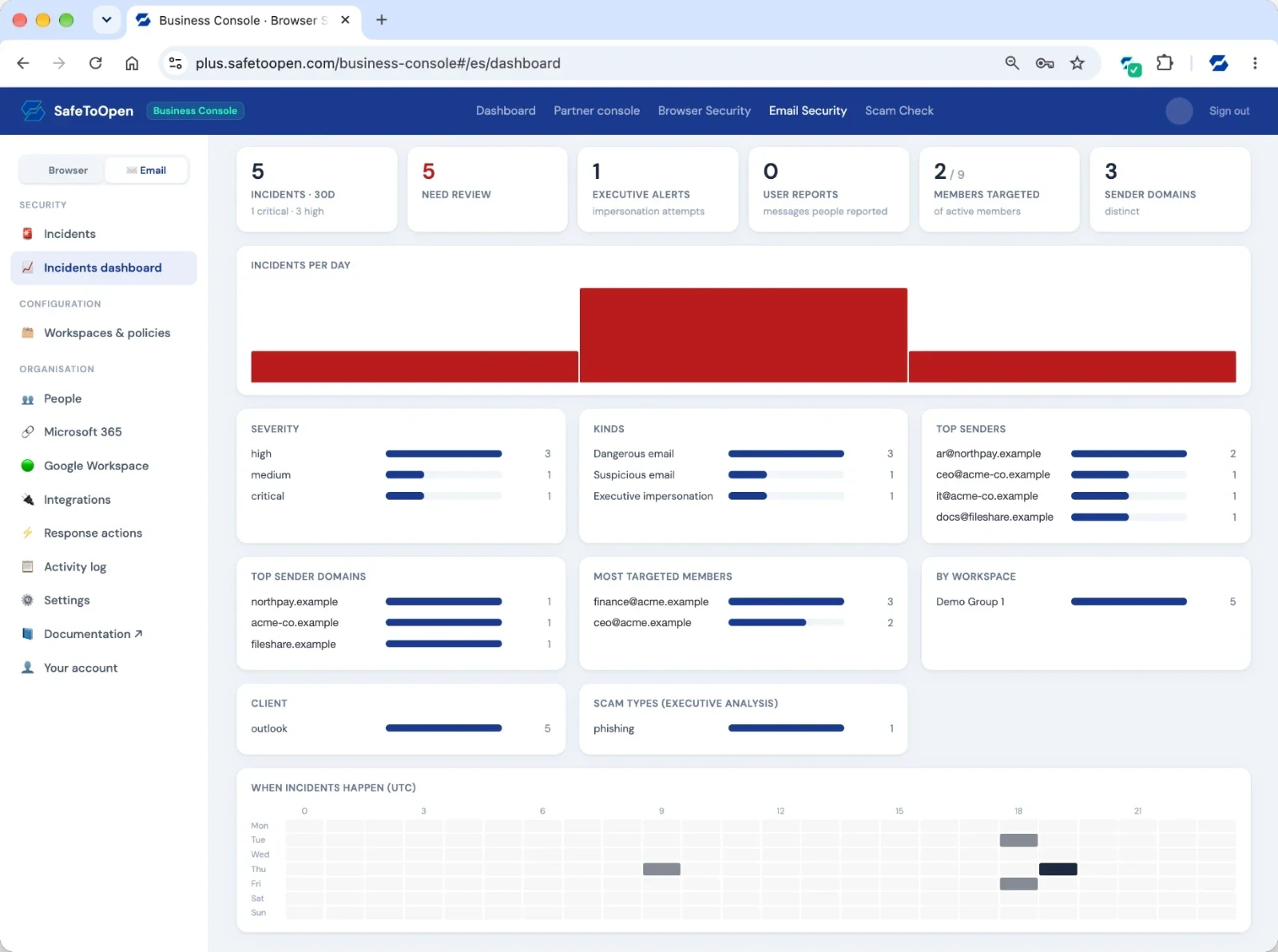
For your security review, before you even ask.
ISO/IEC 27001:2022 certified and independently pen-tested. The full review pack (SoA, pen-test summary, CAIQ) is available under NDA. Visit the Trust Center →
Try it yourself first
Three ways to see SafeToOpen work, before you talk to anyone.
Check a suspicious link
Paste any link and get a verdict in seconds. No sign-up, and nothing opens on your device.
See who on your team would click
Run your first Scam Check campaign free and get a real results dashboard for your team.
Protect your team on a free trial
Roll it out to your team with no credit card, and cancel any time.
Make the case to your team
Editable PowerPoint briefings for leadership, IT and security, with the talk track in the speaker notes.
Browser Security briefing
How detection works, what people see, and a two-week pilot.
Email Security briefing
Business email compromise, checks inside Outlook and Gmail, and a pilot.
Scam Check briefing
An open, timed test of scam awareness, and how to run a first campaign.
Add your organisation’s name on the cover and present. A managed service provider? Get the client presentations →
Questions from IT & security teams
Through a central management console. Admins roll out the browser extension and email security across the organization, assign Plus or Executive seats per person, set policies, and view reporting.
Yes, in both directions. Detections flow out to your SIEM (JSON, OCSF, ECS or CEF), to ServiceNow and Jira, and as STIX/TAXII threat intelligence. Confirmed incidents flow into your enforcement points as response actions: Cisco Umbrella, Zscaler, Netskope, Cloudflare Zero Trust, Microsoft Defender for Endpoint, CrowdStrike, SentinelOne, Sophos, Trend Vision One, Microsoft 365, Mimecast, Proofpoint TRAP, Harmony Email, Cisco ETD, Barracuda, FortiMail, Entra ID, Okta, Google Workspace, Slack, Teams, PagerDuty, Opsgenie and a hosted blocklist for firewalls. Your own threat feeds are ingested and blocked in every browser. See Integrations & automated response.
Yes. Executive seats add Deeper Analysis: when an email looks off, our AI reads it and tells you what kind of fraud it is, such as CEO fraud or a fake invoice. An admin can set it to run on its own for Executive seats. Business Plus lets you mix Plus and Executive seats in one organization.
SafeToOpen is privacy-first and GDPR-ready, with no collection or sale of browsing data, which suits government and regulated environments. Contact us to discuss specific compliance requirements.
Yes. Each AI platform edition is sanctioned, tolerated or unsanctioned per workspace; the extension tells the work edition of ChatGPT, Gemini and Claude from a personal account, shows your message or blocks, and Paste Guard refuses pastes, prompts and uploads carrying personal information on unsanctioned tools. Microsoft and Google tenant restrictions can be enforced from the extension too. The AI usage report gives ISO 42001 and EU AI Act evidence in one export. See Shadow AI governance.
Yes, all three are workspace policies in Browser Security. The ClickFix guard replaces a command a page copies to the clipboard and records the payload as a critical incident. The OAuth consent guard reads Microsoft and Google consent screens and warns on or blocks apps outside your approved list that ask for mailbox, files, contacts or offline access. Password Alert fingerprints the work password on your identity provider and catches it being typed anywhere else, including proxy phishing kits that defeat MFA. A Password logins report lists every site people sign in to without single sign-on. See the guards.
For your team
Prefer a walkthrough?
Tell us a little about your organisation and we’ll set up a time to show you SafeToOpen.
- We reply by email to find a time that suits you.
- We only use your details to reply to your request.
- Prefer to try it yourself? Start a free trial →