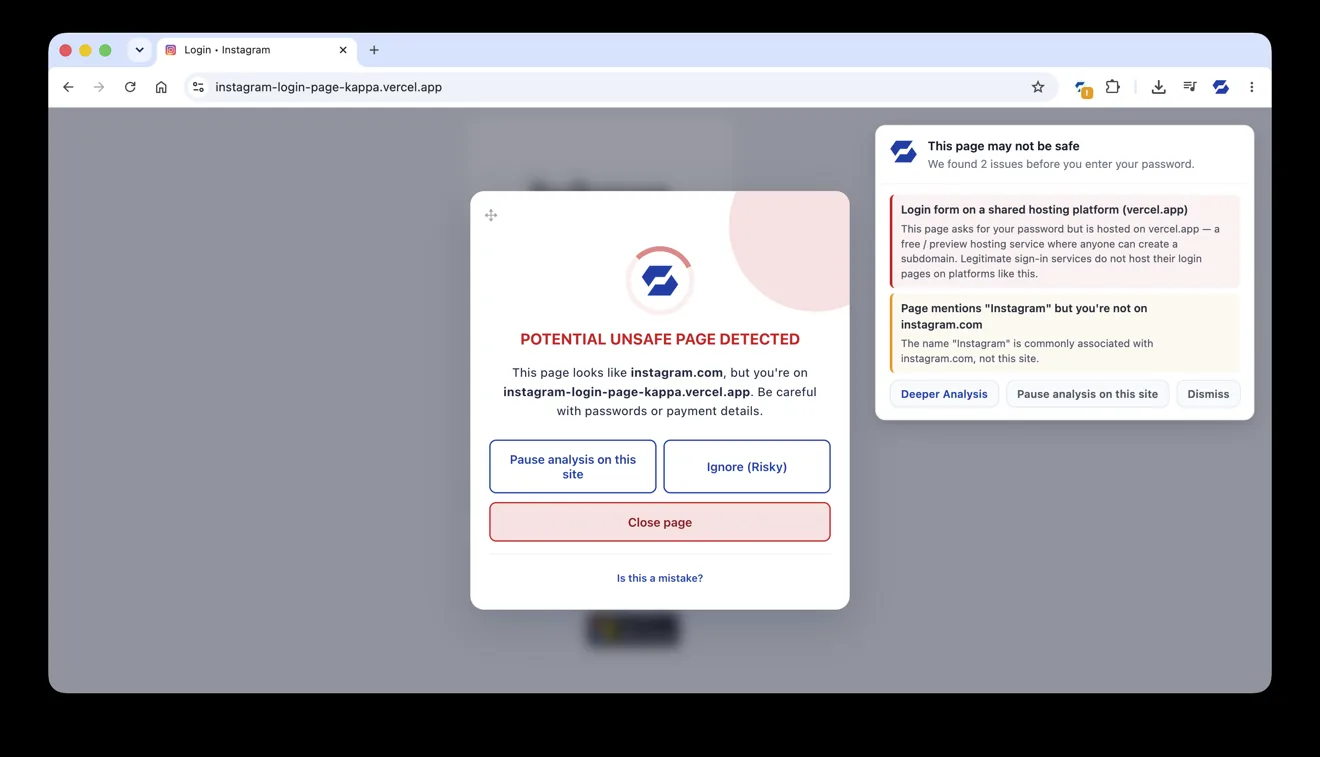
SafeToOpen stopping a fake Instagram login — and spelling out exactly why it’s unsafe, before you ever type a password.
Phishing only succeeds when someone types a password on the wrong page. SafeToOpen stops that moment: it scans every page as it loads, blocks brand-new scams and known-malicious sites, and warns before passwords or card numbers reach the wrong hands — without collecting your browsing data.
SafeToOpen stopping a fake Instagram login — and spelling out exactly why it’s unsafe, before you ever type a password.
Drag the handle: on the left is the login page a visitor sees. On the right is what SafeToOpen’s Deeper Analysis sees — the markup and scripts hidden beneath the surface.
Drag the handle left to reveal the code · illustrative of what Deeper Analysis flags, not a literal report.
Scam texts look real, and the link opens like any other page. On iPhone, the SafeToOpen Safari extension checks the site the moment it loads — and warns you before you type a thing.
Everything SafeToOpen does in the browser falls into four outcomes — stopping attacks, protecting what you type, explaining the risk, and giving organisations control.
Known-bad sites are blocked on arrival. Brand-new ones — the pages built this morning that no blocklist has seen — are judged on what they actually are, before you type anything.
The other direction of risk: not what arrives, but what leaves. SafeToOpen watches for credentials, card numbers and personal details heading into a page that shouldn’t have them.
A verdict you can act on, not a colour you have to interpret. Every warning explains what is wrong, what to look for, and what to do next.
For teams, the same protection reports upward — security events without browsing histories, and policy you set once for everyone.
Paste Guard, About This Site and Deeper Analysis each have their own page if you want the detail — start with Paste Guard. Running it for an organisation or as an MSP? See the business capabilities and data-protection overview.
For organisations: name the AI platforms you sanction, warn on or block the rest, and keep personal data out of unsanctioned tools at the moment of the paste. Workspace policy for the extension you already deploy.
For organisations: three guards for the attacks that pass MFA, and an inventory of the apps people sign in to without single sign-on. Workspace policy, no proxy, no agent.
Real-time protection guards the moment you click. Security Checkup reviews what was already there: your browsing history, your installed extensions, and whether your email appears in a known data breach. One click, usually done in under a minute.
Spots known unsafe sites you have visited, over a look-back you choose: from the last 24 hours to all time.
Flags risky or malicious add-ons among the extensions installed in your browser.
Sees if your email address appears in known data breaches.
Free includes one checkup a day. Plus makes it unlimited, with periodic re-checks that alert you when something new turns up. See the full comparison →
Code is only half the story. VisionAI looks at the visible page — the logo, the layout, the sign-in form — and recognises when a page is dressed up to impersonate a brand you trust. That's how it catches never-before-seen attacks that have no bad code to flag yet.
Otto — the SafeToOpen Assistant — is a small helper that sticks to the side of any page — drag it wherever you like. One click opens its menu, where you can pause protection, hide it, or ask "What is this site?" to learn what a page actually is before you trust it.
"What is this site?" explains the purpose of the page's domain name in plain language — so you can judge for yourself whether that matches what the website in front of you actually claims to be.
As the page loads, a warning appears before you can type a password — showing exactly what SafeToOpen flagged and why. The same real-time engine runs on the desktop browser and on mobile: Safari on iPhone, plus Microsoft Edge and Firefox on Android. Deeper Analysis is available on Plus plans.
“A preferred option for phishing detection.”
In independent research evaluating browser extensions against simulated spear-phishing attacks, SafeToOpen was found to be an effective option for phishing detection — alerting users to threats and blocking malicious connections in controlled tests.
Read the researchSafeToOpen never collects, stores, or sells your browsing data. It blocks known trackers, keeps your searches private, and only checks what it needs to keep you safe.
Free blocks the threats already known to be dangerous. Plus adds the real-time detection that catches brand-new, never-before-seen attacks, and the guards for the tricks that need no phishing page at all.
| Feature | Free | Plus |
|---|---|---|
| Visual inspection to detect never-before-seen phishing pages Stops new phishing | – | |
| Deeper Analysis (full x-ray of page components) Stops new phishing | – | |
| Blocks known malicious URLs (blocklist updated every minute) | ||
| Blocks known malware & dangerous files | ||
| Warns you when you click a known malicious link | ||
| Inspect website elements | Limited | Unlimited |
| “What’s this site?” checks | Up to 3 / day | Unlimited |
| Tracker blocker | ||
| Security Checkup (browsing history, installed extensions, compromised account) | Once a day | Unlimited |
| Periodic Security Checkup | – | |
| Link safety badges | + domain information | |
| Detect phishing from email attachments | – | |
| Paste Guard (stops personal info being pasted into sites) | – | |
| ClickFix guard (stops pages that trick you into running a command) | – | |
| OAuth consent guard (warns before an app gets lasting access to your mailbox or files) | – | |
| URL sandbox preview | – | |
| Add free | Get Plus |
Browser protection is free for personal use, on unlimited devices. Add multi-device, family or team cover whenever you're ready.
See all plans and email security on the pricing page →
Instead of relying on a blocklist of reported URLs, SafeToOpen analyses each risky page as it loads — its appearance, structure and behaviour — and recognises a scam by what it actually is. That lets it catch never-before-seen (zero-day) phishing pages in seconds.
No. SafeToOpen never collects, stores, or sells your browsing data. It also blocks known trackers from collecting it, and keeps your searches private.
Chrome, Edge, Safari and Firefox on desktop, plus mobile — including Microsoft Edge on Android, which you install and register exactly the way you do on desktop, and iOS.
There’s a free plan for personal use with no sign-up that blocks known phishing, scam and malware sites. Zero-day detection, Paste Guard and email security are on the paid Plus plans.
The free plan has no device limit — install it on as many browsers and devices as you like. A paid Plus plan covers up to 5 devices per person; if you add a 6th, the device you used least recently is signed out automatically. Family Plus gives each of up to 5 people their own 5 devices.
For organisations, yes. Business workspaces put every AI platform in a tier (sanctioned, tolerated, unsanctioned), show their own message or block, and set what Paste Guard does with pasted text, prompts and uploads on each tier. The AI usage report shows who uses which tools and what was refused. See Shadow AI governance.
For organisations, yes. The ClickFix guard replaces a command a page copies to the clipboard and tells the person what happened; the OAuth consent guard warns on or blocks unapproved apps asking for mailbox or files access on genuine Microsoft and Google sign-in pages; Password Alert catches the work password typed anywhere but the identity provider; and a Password logins report lists the apps used without single sign-on. See the guards.
Free plan for personal use, no sign-up. Real-time protection and privacy from the moment you install it.