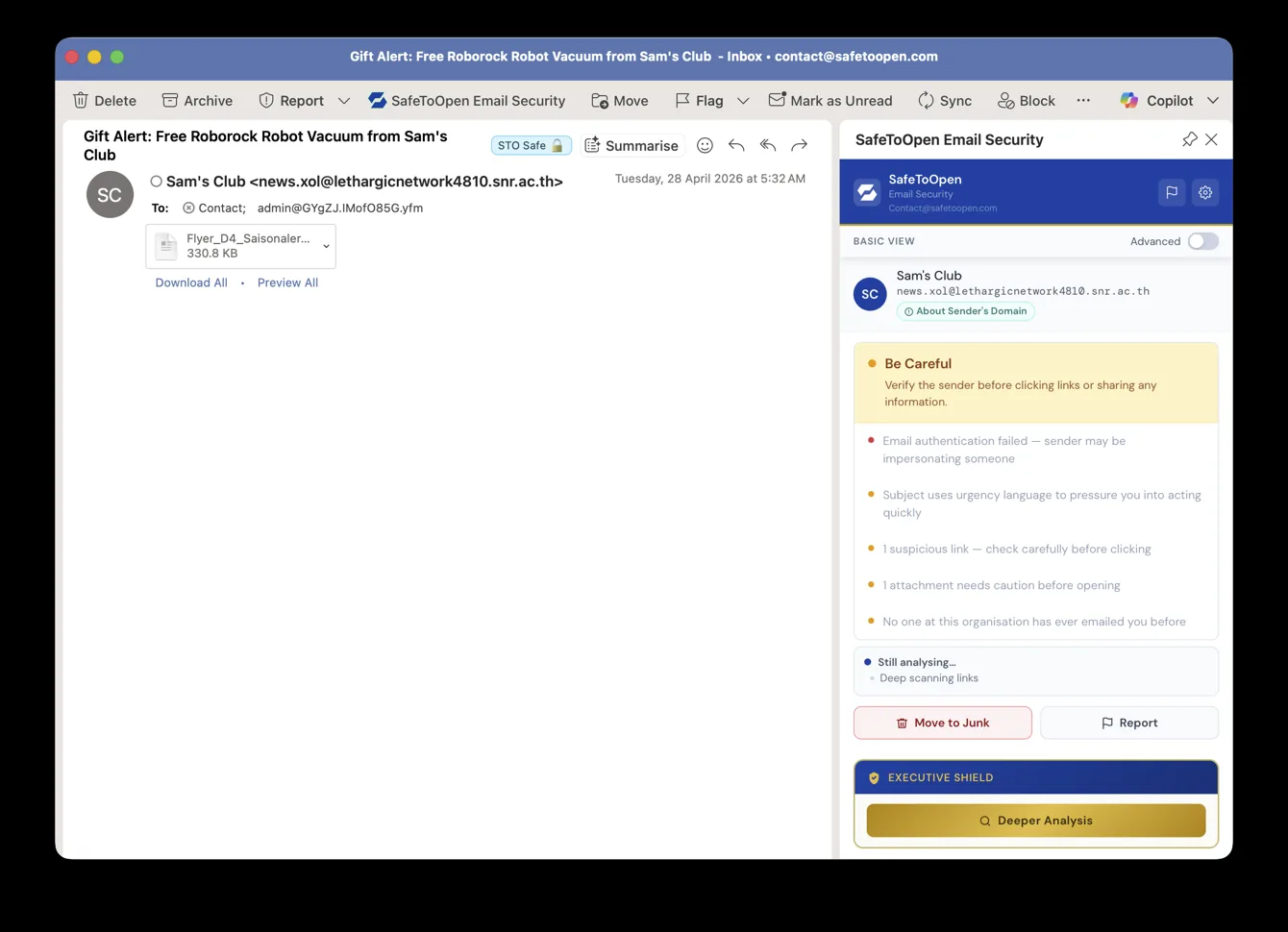
Email Security working inside Outlook — flagging a fake “Sam’s Club” gift email: failed authentication, urgency language, a suspicious link and a risky attachment, right next to the message.
SafeToOpen runs up to 71 checks on a message in one click — and its AI-powered Deeper Analysis catches sophisticated CEO-fraud and business email compromise (BEC) that slips past spam filters, all client-side in Outlook and Gmail. Far more than a link checker.
NOW ON THE GOOGLE WORKSPACE MARKETPLACE · FREE TRIAL · GOOGLE CASA VERIFIED
Email Security working inside Outlook — flagging a fake “Sam’s Club” gift email: failed authentication, urgency language, a suspicious link and a risky attachment, right next to the message.
Wherever you read email, verification is one click away — no switching apps, no copying messages elsewhere.
Every device and operating system — so the whole organization is covered the same way.
Both the way you read Gmail on a computer and the way you read it on your phone.
Open a message you're unsure about and verify it instantly — a clear trust score tells you how safe it really is.
Automatically scans HTML attachments and file-based links to detect phishing threats before you open them.
For high-value targets: an advanced check for targeted and business email compromise (BEC) attacks.
In Outlook or Gmail, on any device. Spot something off — a tone, a link, an attachment.
SafeToOpen analyses the sender, links and attachments and returns a clear trust score.
Safe badges show what's fine to click; threats are flagged before any harm is done.
Plus runs every check except Deeper Analysis. Executive adds full AI body analysis on top.
<3 SEC TYPICAL VERDICT — ANALYSIS PRE-LOADS THE MOMENT AN EMAIL IS OPENED
No separate dashboard, no forwarding messages to a security team. The verdict appears next to the message you're already reading, in the client you already use.
CEO FRAUD / BEC
An email appears to come from your MD asking accounts to urgently transfer funds to a new supplier. The sender’s domain is a one-character variation of yours.
SAFETOOPEN CATCHES: Domain typosquatting · failed DMARC · first-time sender · urgency language · wire-transfer pattern
SUPPLIER IMPERSONATION
A criminal compromises a supplier’s email and sends your accounts team updated bank details for upcoming invoices. The email looks completely legitimate.
SAFETOOPEN CATCHES: Thread hijacking · request anomaly (bank-detail change) · sender-history anomaly
PHISHING LINK
A convincing Microsoft-branded email links to a fake login page, built to steal credentials that hand attackers your business email.
SAFETOOPEN CATCHES: Malicious URL · domain registered days ago · failed authentication · urgency language
Choose Personal & Family or Business, then pick monthly or yearly. Executive adds protection for high-value targets.
All prices are in US dollars (USD). See all plans on the pricing page →
FREE TRIAL — NO CREDIT CARD · DEPLOY VIA THE M365 ADMIN CENTRE OR GOOGLE WORKSPACE MARKETPLACE IN UNDER 5 MINUTES · NO MAIL-FLOW CHANGES · CANCEL ANY TIME
Share it internally: download the one-pager (PDF) →
Microsoft Outlook across all devices and operating systems — Windows, macOS, Outlook on the web, and the Outlook mobile apps for iOS and Android — and Gmail in both the web interface and the mobile app.
Email security is counted per email address, not per device. A personal plan covers up to 3 email addresses (Outlook and/or Gmail), and there’s no limit on the number of devices — install the add-in on every computer and phone you read those mailboxes on. Business plans are priced per seat.
Open a suspicious message and verify it in one click. SafeToOpen returns a clear trust score, scans HTML attachments and file links, and shows safety badges next to links so you can see what's safe before you click.
An advanced check for targeted and business email compromise (BEC) attacks. It verifies the sender and writing style and flags impersonation and lookalike domains — going beyond a standard trust score for high-value targets. Available on Executive and Business plans.
No — it works alongside your existing spam filter and antivirus. They rely on lists of known-bad senders; SafeToOpen analyses the message and its links and attachments directly, catching never-before-seen phishing they miss.
No — it complements it. Your existing filter (Microsoft Defender, Google’s native filtering, Mimecast and similar) catches obvious spam; SafeToOpen catches the sophisticated attacks that look legitimate and slip through.
No. Any Microsoft 365 admin can push the add-in via the M365 Admin Centre, and any Google Workspace admin via the Workspace Marketplace — both take under five minutes, with no mail-flow changes and no infrastructure.
Add SafeToOpen email security to Outlook and Gmail, and verify any suspicious message in one click — on every device.
SHARE IT INTERNALLY: DOWNLOAD THE ONE-PAGER (PDF)