Stop invoice fraud and CEO fraud before anyone pays.
These emails often pass authentication and carry no link or attachment. SafeToOpen shows what doesn’t add up, right inside Outlook and Gmail.
Business email compromise, in numbers
How SafeToOpen stops it
One click on the email, in the inbox your people already use.
Invoice fraud
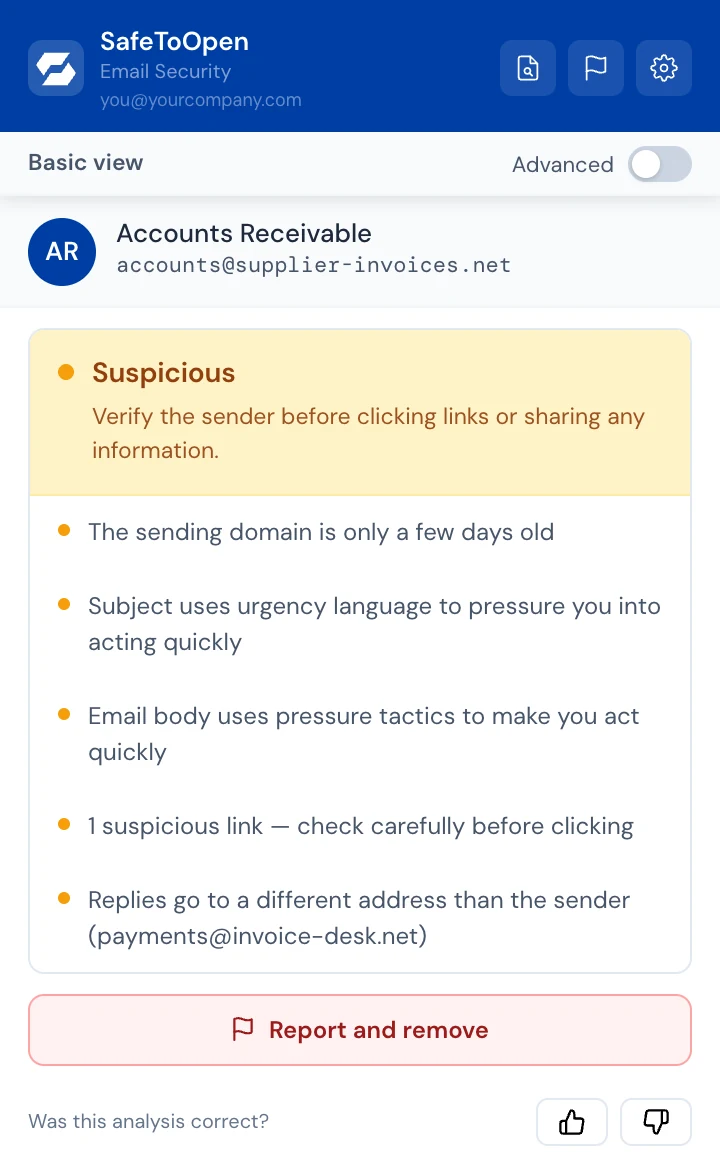
An overdue invoice with new bank details often passes authentication. SafeToOpen shows what doesn’t add up: replies go elsewhere and the domain is days old.
CEO fraud
A payment request posing as your managing director, with no link and no attachment. Deeper Analysis, on Executive seats, reads the request itself, with the person’s permission.
A plain answer, with the reasons
One click runs up to 71 checks on the sender, links, QR codes and attachments, and gives a trust score with the reasons in plain English.
Report and remove
One click sends the email to your security team and takes it out of the inbox: to Junk in Outlook, to Spam in Gmail.
Checked, not just claimed
Read more
Business email compromise, explained
How it works, who it targets, and how to defend the people most at risk.
Read it → How-toIs this email a scam? A 60-second check
The quick checks to run before you pay, click or reply.
Read it → How-toHow to spot a phishing email
Sender tricks, urgency, links and attachments.
Read it →Questions, answered
On Executive seats, when an email looks off, our AI can read it and tell you what kind of fraud it is, such as a fake CEO or a fake invoice. It only runs when you press “Run deeper analysis” and agree, and the email isn’t stored or used for training. On Business plans, an admin can set it to run on its own for Executive seats; the organisation then gives the permission for its people.
No. It works alongside your existing spam filter and antivirus. They rely on lists of known-bad senders; SafeToOpen analyses the message and its links and attachments directly, catching never-before-seen phishing they miss.
No. Any Microsoft 365 admin can push the add-in via the M365 Admin Centre, and any Google Workspace admin via the Workspace Marketplace. Both take under five minutes, with no mail-flow changes and no infrastructure.
For your team
See it on a fake invoice
Tell us a little about your organisation and we’ll show you Email Security in Outlook and Gmail.
- We reply by email to find a time that suits you.
- We only use your details to reply to your request.
- Prefer to try it yourself? Start a free trial →