- Use cases rated runnable, partial or missing
- A ranked list of log sources to onboard next
- ATT&CK coverage map and Navigator export
- Coverage for CIS Controls v8, NIST CSF 2.0, ISO 27001:2022, PCI DSS 4.0, Essential Eight and CERT NZ
LogLens looks at your logs and tells you which industry best-practice security use cases you can run today, what to add for more visibility, and which logs you can stop paying to ingest. Then it pushes the new detections into your SIEM, and response playbooks into your SOAR. It needs no internet and uses no AI, and sensitive data is redacted as it’s read.
Works with the SIEM you already run
Answers most security teams can’t get from the SIEM itself.
LogLens reads your logs and shows which of its 50+ industry best-practice use cases you can run now, mapped to MITRE ATT&CK and to frameworks such as ISO 27001, NIST CSF and PCI DSS.
It ranks the log sources you’re missing by how much detection coverage each one unlocks, so your next onboarding decision is a number, not a guess.
Choose the use cases you need and LogLens shows the logs they rely on, the sources you’d have to add, and the data no detection uses, so you can stop paying to ingest it.
Deploy the detections, including attack stories built from real attacks, into your SIEM, and each use case’s response playbook into your SOAR, in a few clicks, after reviewing exactly what will be created.
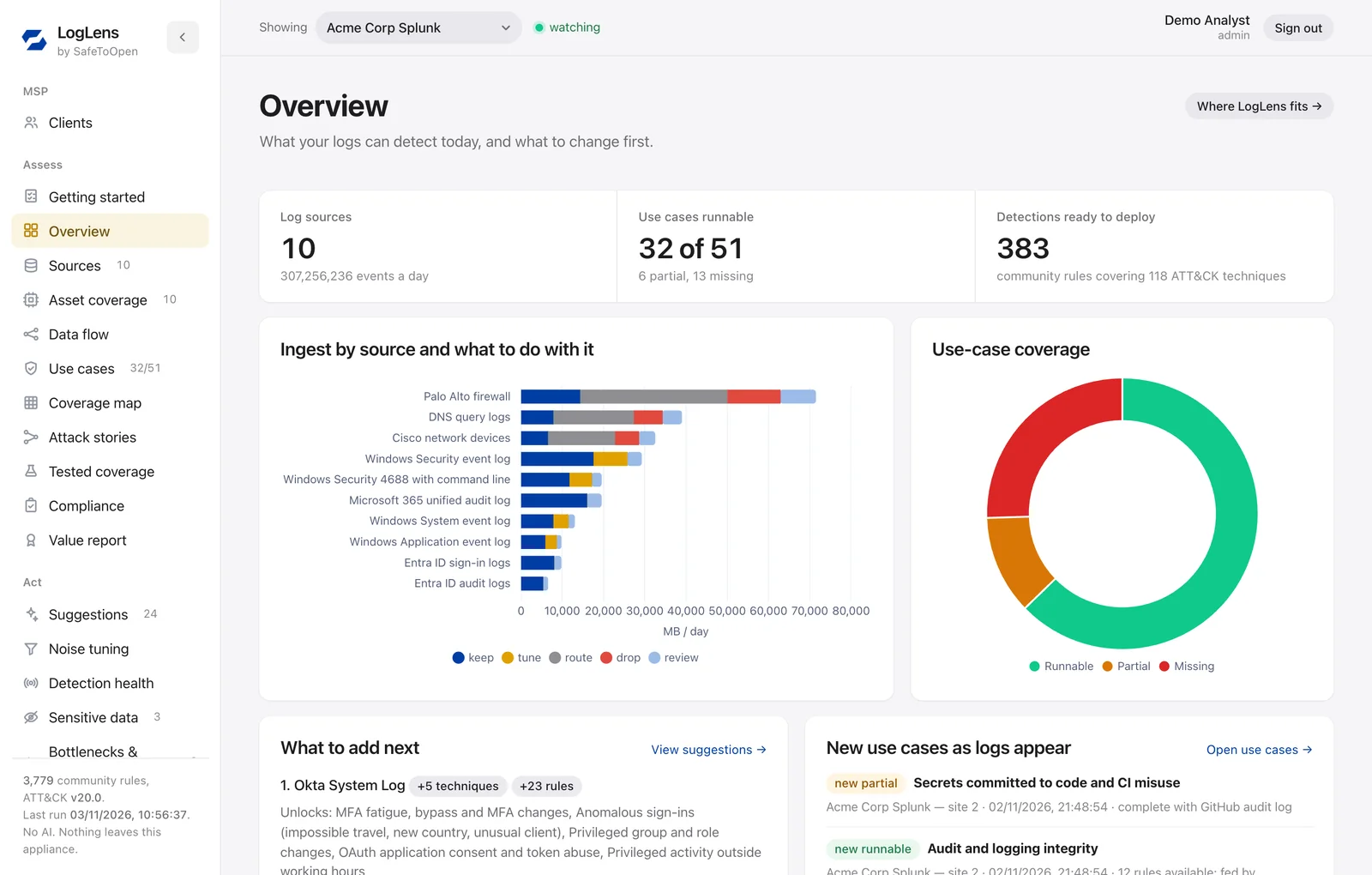
The LogLens overview, shown on sample data: what the logs can detect today, how much each source sends a day and what to do with it, and which source to add next.
LogLens sits beside your SIEM on its own virtual machine. The first assessment starts as soon as you connect it.
Give LogLens a read-only account on your SIEM. Exact volumes come from the platform’s own counts, and each sampled event is redacted as it’s read.
Deterministic fingerprints identify every source and event type: Windows, Sysmon, Entra ID, Microsoft 365, AWS CloudTrail, Okta, firewalls, Linux and more.
50+ use cases are matched against your sources, the Sigma rule library and MITRE ATT&CK, both built into LogLens: runnable, partial or missing, with what would unlock each one.
Add the source that unlocks the most, cut the volume nothing uses with ready-made filters, and deploy detections to your SIEM and response playbooks to your SOAR after reviewing each one.
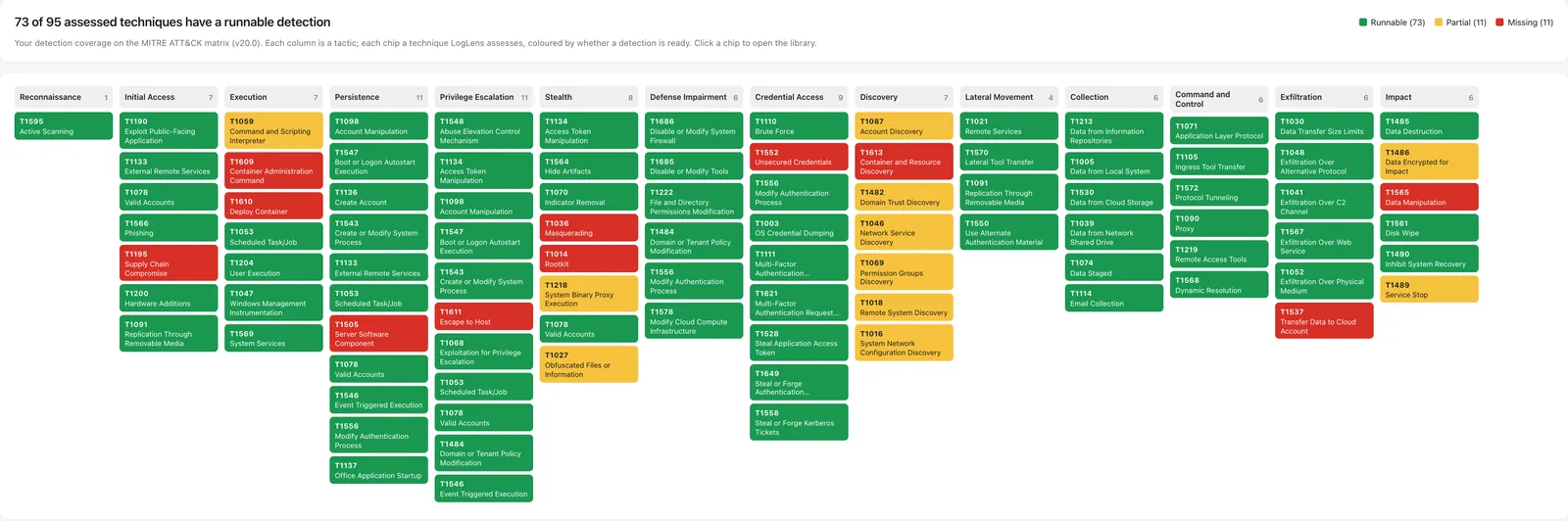
Every technique LogLens assesses, across every ATT&CK tactic, coloured by whether you have a detection that can run on the logs you collect today.
The full ATT&CK coverage map, on sample data. Green has a runnable detection, amber is partial (for example, Windows process logs without Sysmon), red is missing. Move your mouse over the image to magnify it; on a phone, tap to open it full size.
LogLens checks every event type against every detection rule that could use it, then tells you what to keep, route, drop or tune, with the reason for each.
Each particle is a slice of your log volume flowing to the SIEM. The coloured lanes are what LogLens can take off the SIEM: dropped, routed to cheaper storage, or tuned out at the source before it ever lands.
Data your detections use goes to the SIEM, as today.
Data you must retain but rarely search moves to cheaper storage, still there for investigations.
Data no detection reads, such as debug output and health checks, stops costing you.
Noisy sources are trimmed where they start, with ready-made filters for your collector.
Authentication, privilege and audit logs are never recommended for dropping; at most they’re routed to cheaper storage. Filters come ready for Wazuh agents, Splunk, Sentinel DCR, Cribl, rsyslog, FortiGate and Windows audit policy.
Real attacks happen in stages. An attack story links those stages on the same host or user into one correlation rule, so you get one high-confidence alert instead of several noisy ones. Add one to your SIEM in a few clicks.
Example: Shadow AI — sensitive data sent to an AI service
Seen in Windows, Sysmon, Microsoft 365 audit or database logs.
ChatGPT, Claude, Gemini, Copilot or Perplexity, seen in proxy, DNS, Zeek or firewall logs.
A large or repeated upload to that service, seen in proxy, Zeek or firewall logs.
Any two of these on the same host within two hours raise one alert. LogLens shows which stages your logs can already see, and which source would complete the story.
Each story compiles into one correlation rule. Push it to Splunk, Microsoft Sentinel, Elastic, CrowdStrike or Sumo Logic in a few clicks after reviewing it; for other SIEMs, LogLens gives you the rule logic to build.
A detection tells you something happened. Every LogLens use case also comes with a response playbook that says what to do next, aligned to MITRE ATT&CK and ready for your SOAR.
Autoruns unattended Approvewaits for an analyst Manualstays with people
Searches, enrichment and opening a case are marked safe to run unattended. Disruptive actions, such as disabling an account, isolating a host or blocking traffic, wait for an analyst’s approval. Forensics, legal and rebuilds stay with people.
Export a playbook for Cortex XSOAR, Splunk SOAR, Microsoft Sentinel Logic Apps or Google SecOps SOAR, as vendor-neutral workflow JSON for Tines, Torq and other SOARs, or as a Markdown runbook.
An administrator reviews the exact playbook before LogLens sends it to Cortex XSOAR, Splunk SOAR, Tines, Torq or Google SecOps SOAR, with its own SOAR credential kept apart from the read-only log connections. Nothing is sent on a schedule.
Playbooks are a starting point aligned to ATT&CK, not a replacement for your incident response plan. Containment steps arrive ready to connect to your own EDR, identity provider and firewall, and LogLens shows how much of the recommended response across your use cases a SOAR could run.
One virtual machine in your network, with the Sigma rule library and MITRE ATT&CK built in. LogLens reads through your SIEM’s own API with a read-only account, so nothing in your data path changes, and if you switch it off, nothing notices.
Swipe sideways to see the whole diagram.
Logs keep flowing from your sources to your SIEM exactly as they do today. LogLens only reads.
No agents, no changes to collectors or log forwarding. A read-only account on the SIEM is all it needs.
Detections reach your SIEM, and playbooks your SOAR, only through separate deploy credentials, after an administrator reviews the plan. Deployed detections can be rolled back.
LogLens was built to understand security logs without exposing them: it needs no internet, uses no AI, and redacts sensitive data as it reads it.
LogLens talks only to your SIEM, and the Sigma rule library and MITRE ATT&CK are built in. With an on-premises SIEM it runs fully air-gapped. With a SaaS SIEM it makes outbound, read-only calls to that SIEM’s API and nothing else. No telemetry, no licence check-in, no vendor cloud.
No language model or machine-learning model reads your logs, and nothing is sent to an AI service. Classification, coverage and recommendations are deterministic rules, so every result can be traced and repeated.
As LogLens reads each event, card numbers, passwords, tokens and API keys, national ID and tax numbers, IBANs and dates of birth are masked, and e-mail addresses and user names are replaced with pseudonyms, before anything is written to disk or shown on screen. The analysis needs field names and shapes, not your values.
A least-privilege account that can only search. TLS is verified against a CA or a pinned certificate; turning verification off isn’t an option.
Redacted samples are deleted on a retention schedule you set, and removing a connection deletes its results.
No default password: setup uses a one-time code printed on the appliance console. Sign in with SSO (OpenID Connect) or a local account with authenticator-app MFA.
Platform credentials are encrypted at rest on the appliance and never returned by its API.
Sign-ins, setting changes, connections, report downloads and deployments are logged, ready to forward to your SIEM.
Nothing is hosted by us and nothing is shared between customers. MSPs get a separate database for every client.
Many new security tools send your logs to an AI service to make sense of them. LogLens uses no AI of any kind, by design, so the most sensitive data you hold never leaves your control.
Nothing is sent to OpenAI, Anthropic, Google or any other model provider, so there is no third-party API your data could leak through.
No model learns from your logs, here or anywhere else, and no provider keeps a copy to improve its service.
No AI vendor joins your supply chain, so there is nothing extra for your privacy impact assessment, vendor-risk review or data-residency rules.
Deterministic rules give the same answer every time, with the detection rule or documented reason behind each one. Nothing is guessed, and nothing is invented.
The appliance contains no models, no model downloads and no AI libraries: just rules you can read.
Finance, healthcare, government and critical infrastructure teams can assess their logs where sending them to an AI service isn’t allowed.
Run one LogLens appliance for all your clients, whichever SIEM each one uses, with every client’s data kept in its own separate database.
Connect a new client’s SIEM and the first assessment runs on its own: what they can detect, what to add and what they overspend on, in place of weeks of manual scoping.
A portfolio view shows each client’s runnable use cases, open alerts, daily ingest and the volume you could take off their SIEM.
The onboarding list shows which log sources would close each client’s gaps, giving you an evidence-based case for onboarding more sources and use cases.
Volume recommendations and ready-made filters show what each client can stop paying to ingest, with a value report to share at review time.
Push the same use cases and attack stories into Splunk, Sentinel, Elastic, Wazuh and more after review, send their response playbooks to each client’s SOAR, and hear when a client’s detection goes quiet.
One database per client, per-client retention and deploy settings, and client logins that only ever see that client’s data.
LogLens keeps watching after the first report, so coverage stays true as your sources change.
Splunk, Microsoft Sentinel, Elastic and OpenSearch, Wazuh, Graylog, IBM QRadar, Google SecOps, CrowdStrike Falcon Next-Gen SIEM, Sumo Logic, Exabeam, Devo, and exported log files.
Splunk, Microsoft Sentinel, Elastic, OpenSearch, Wazuh, Graylog, Google SecOps, Microsoft Defender XDR, CrowdStrike and Sumo Logic.
Cortex XSOAR, Splunk SOAR, Microsoft Sentinel Logic Apps, Google SecOps SOAR, Tines and Torq, plus vendor-neutral workflow JSON for any other SOAR.
Entra ID, Microsoft Defender, CrowdStrike, Active Directory (LDAP), Tenable, Qualys, Rapid7, ServiceNow, NetBox, Snipe-IT, Fleet, Zabbix, Nmap and CSV inventories.
Slack, Microsoft Teams, email and webhooks: a connection going down, a source going silent, a detection going quiet.
An executive value report on coverage, volume you can take off the SIEM, proven detections and compliance, ready to download.
Book a demo and we’ll walk through LogLens on sample data, then show what an assessment of your own SIEM involves.
No. LogLens talks only to your SIEM, and the Sigma rule library and MITRE ATT&CK are built into it. With an on-premises SIEM it can run fully air-gapped. With a SaaS SIEM it needs outbound HTTPS to that SIEM's API and nothing else. There is no telemetry and no licence check-in.
No, none at all. No language model or machine-learning model reads your logs, and nothing is sent to an AI service, so your logs never become a prompt or training data. Classification, coverage and recommendations are deterministic rules, so every recommendation traces back to a detection rule or a documented reason.
It is redacted as LogLens reads each event: card numbers, passwords, tokens and API keys, national ID and tax numbers, IBANs and dates of birth are masked, and e-mail addresses and user names are replaced with pseudonyms, before anything is written to disk or shown on screen. Stored samples are deleted on a retention schedule you set.
Yes. Add the use cases and attack stories you want to your plan, and LogLens shows which of them your logs already support, which log sources you would need to add, and which data no detection uses, so you can stop paying to ingest it.
Detections built from how real attacks unfold, such as ransomware, MFA fatigue or sensitive data being sent to an AI service. Each story links several stages on the same host or user into one correlation rule, so you get one high-confidence alert instead of several noisy ones.
Yes. Every use case comes with a response playbook aligned to MITRE ATT&CK, with each step marked as safe to automate, needing an analyst's approval, or manual. You can export it for Cortex XSOAR, Splunk SOAR, Microsoft Sentinel Logic Apps or Google SecOps SOAR, or as vendor-neutral workflow JSON, and an administrator can send it to Cortex XSOAR, Splunk SOAR, Tines, Torq or Google SecOps SOAR after reviewing it.
No. It connects with a read-only account and only searches. Pushing detections into your SIEM is a separate, optional step with its own credential, and nothing is created until an administrator has reviewed exactly what will be added.
It reads from Splunk, Microsoft Sentinel, Elastic and OpenSearch, Wazuh, Graylog, IBM QRadar, Google SecOps, CrowdStrike Falcon Next-Gen SIEM, Sumo Logic, Exabeam and Devo, as well as exported log files. It can deploy detections to Splunk, Sentinel, Elastic, OpenSearch, Wazuh, Graylog, Google SecOps, Microsoft Defender XDR, CrowdStrike and Sumo Logic.
Authentication, privilege and audit logs are never recommended for dropping; at most they are routed to cheaper storage. Every recommendation shows the volume, the detection rules that use that event type and the reason, so nothing is cut blind.
Yes. One appliance holds all your clients, each in its own separate database, with its own retention and deploy settings. A portfolio view shows every client at a glance, and client logins only ever see that client's data.