A secure enterprise browser, without a new browser.
Stop phishing, protect sign-ins and keep company data out of the wrong tools, right where work happens. SafeToOpen adds secure enterprise browser (SEB) controls to Chrome, Edge, Firefox and Safari, so your people keep the browser they know.
What is a secure enterprise browser?
A secure enterprise browser (SEB) puts security and data controls inside the browser, where people sign in, open links, paste data and use AI tools. It sees the page itself at the moment of the click, where phishing, risky sign-ins and data leaks play out.
Replace the browser
Some secure enterprise browsers are a separate browser. Staff move to it for work, and IT rolls it out, keeps it updated and checks that every work app runs in it.
Add the controls to the browsers you already use
Others arrive as a managed extension. People keep Chrome, Edge, Firefox or Safari, and IT deploys the controls with the device management it already runs. SafeToOpen Browser Security works this way.
What SafeToOpen Browser Security covers
The controls a secure enterprise browser is chosen for, set per workspace and managed from one console.
Phishing stopped as the page loads
Pages are judged on what they are as they load, not only on lists of known-bad sites, so brand-new phishing is blocked before a password or card number is typed.
Proxy kits, fake CAPTCHAs and rogue apps
Proxy kits that relay your MFA, fake CAPTCHAs that ask staff to paste a command, and requests for risky app access each have their own guard in the browser.
Sign-ins your identity provider can’t see
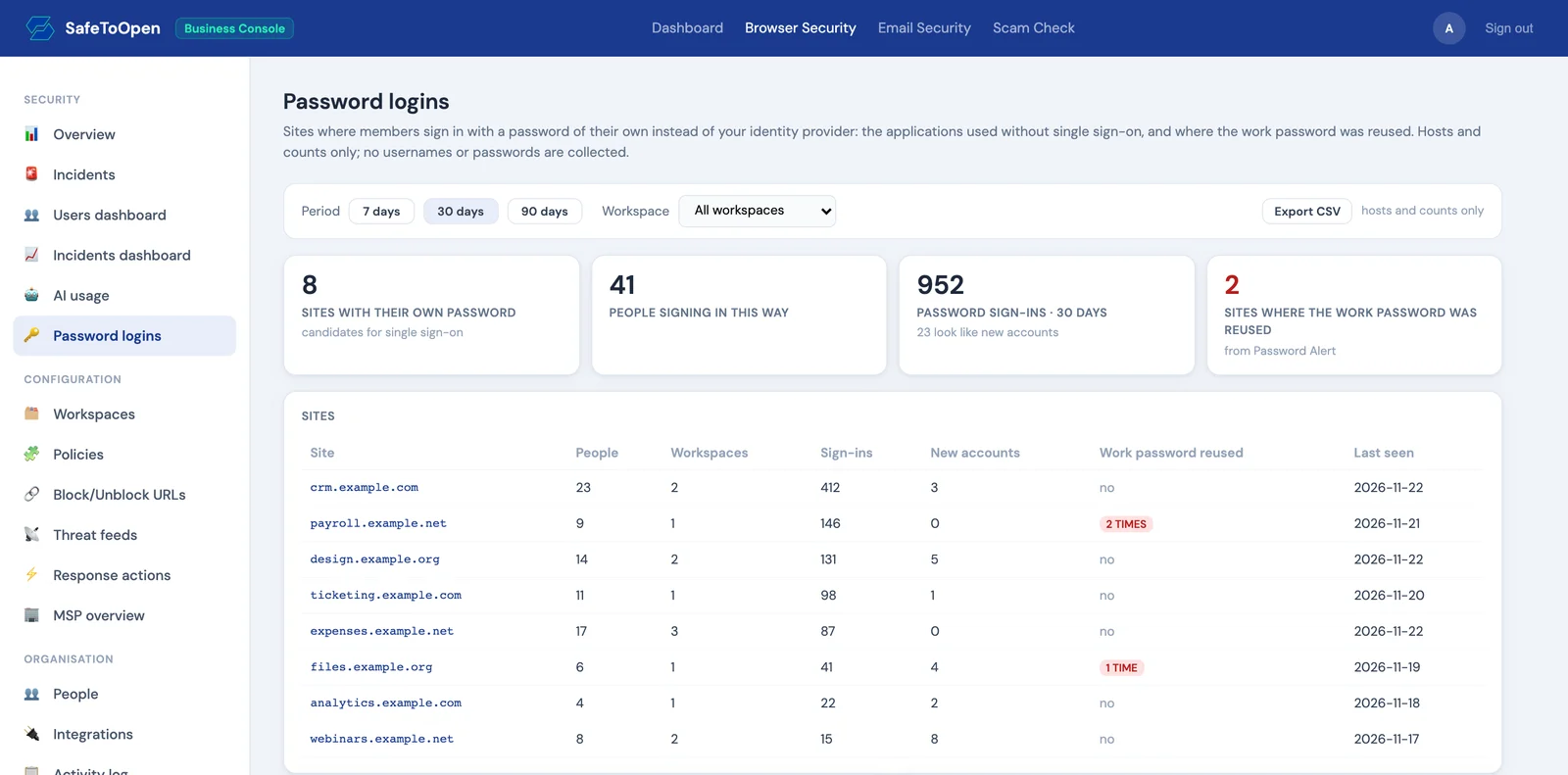
Password Alert catches the work password typed into the wrong site, and the Password logins report lists every app people sign in to without your single sign-on.
Sensitive data kept in its place
Paste Guard checks what is pasted, typed or uploaded into websites and AI tools, warns or refuses when it finds personal data, and redacts card numbers on the device.
AI tools under policy
Each AI tool is sanctioned, tolerated or blocked per workspace, work and personal editions are told apart, and Microsoft and Google sign-ins can be limited to your own tenants.
Your console, your SIEM, your tools
Policies per workspace and a full audit trail, incidents sent to Splunk, Sentinel, Elastic or QRadar, and one-confirm response actions into Defender, Entra ID, Zscaler and 20+ other tools.
What to look for in a secure enterprise browser
Ask these of any product, including ours.
Checked, not just claimed
Read more
Which apps still use a password?
Find every app your people sign in to without SSO, and what to do with the list.
Read it → ExplainerWhy EDR & antivirus miss web-based threats
Work moved into the browser, and so did the attacks: a layer endpoint tools were never built to see.
Read it → PrivacyIs a browser security extension safe to install?
It can read your pages, so should you trust it? How to vet one, and what a good extension never does.
Read it →Questions, answered
A secure enterprise browser (SEB) brings security and data controls into the browser. It stops phishing and malicious pages, protects sign-ins, controls which sites and AI tools get company data, and gives IT one place to set policy and see incidents. Some are a separate browser; others, like SafeToOpen Browser Security, add the controls to the browsers people already use.
No. Browser Security works in Chrome, Edge, Firefox and Safari as a managed extension. People keep their browser, bookmarks and work apps, and IT deploys it silently with the device management it already runs.
It is neither a proxy nor an agent, and nothing is routed through SafeToOpen. SafeToOpen never collects, stores or sells browsing data. It processes only the minimum needed to confirm a threat and deletes it after analysis.
Your administrator force-installs it with Intune, Group Policy, Jamf, Chrome Enterprise or your RMM, with the device and user pre-registered, so nobody has to sign in. People can’t turn it off.
No. It works alongside them. They see traffic and files; Browser Security sees the page itself at the click. When an incident is confirmed, it can block the threat in Zscaler, Cisco Umbrella, Defender for Endpoint and the other tools you already run.
Yes. Each client gets its own workspace, policies and reports in the multi-tenant console, and warnings, the console and the sign-in page can carry your brand and domain.
For security and IT teams
See it in the browsers you already use
Tell us a little about your organisation and we’ll show you Browser Security and the console.
- We reply by email to find a time that suits you.
- We only use your details to reply to your request.
- Prefer to try it yourself? Start a free trial →